
Your AI Agent Knows Everything About You. Where Does That Data Go?
You gave your AI agent access to your email, your calendar, your Slack, your files. Maybe your code repos. Maybe your browser. You did this because you wanted it to be useful, and it can't be useful without context.
But here's the question nobody seems to ask: where does all of that go?
When you type a message to ChatGPT, you're sending it to OpenAI's servers. When your AI agent reads your email and summarizes it, that email text gets sent to a model API somewhere. When it browses your files looking for that contract you mentioned, the contents of those files travel over the wire to a data center you don't control.
Most people don't think about this. They should.
The data problem with cloud AI agents
Cloud-based AI agent platforms work like this: your data goes up, gets processed, comes back down. Simple. Also terrifying if you think about it for more than thirty seconds.
Your AI agent doesn't just see individual messages. Over time, it builds up a picture of your entire life. Your work projects, your personal relationships, who you email, what you search for, your financial documents, your medical records if you're not careful. It's the most complete profile of you that has ever existed, and it's sitting on someone else's computer.
"But they have privacy policies!" Sure. Privacy policies that say they can use your data to improve their models. Privacy policies written by lawyers whose job is to give the company maximum flexibility. Privacy policies that change whenever the company feels like changing them.
I'm not saying these companies are evil. I'm saying the incentive structure is broken. They make money from data. You generate data. The math isn't complicated.
What "privacy-first" actually means
"Privacy" has become one of those words that means whatever the marketing team needs it to mean this quarter. So I want to be concrete.
A privacy-first AI agent means your data stays on hardware you control. Not "our servers are very secure." Not "we encrypt everything." Your machine. Your hard drive. Your network.
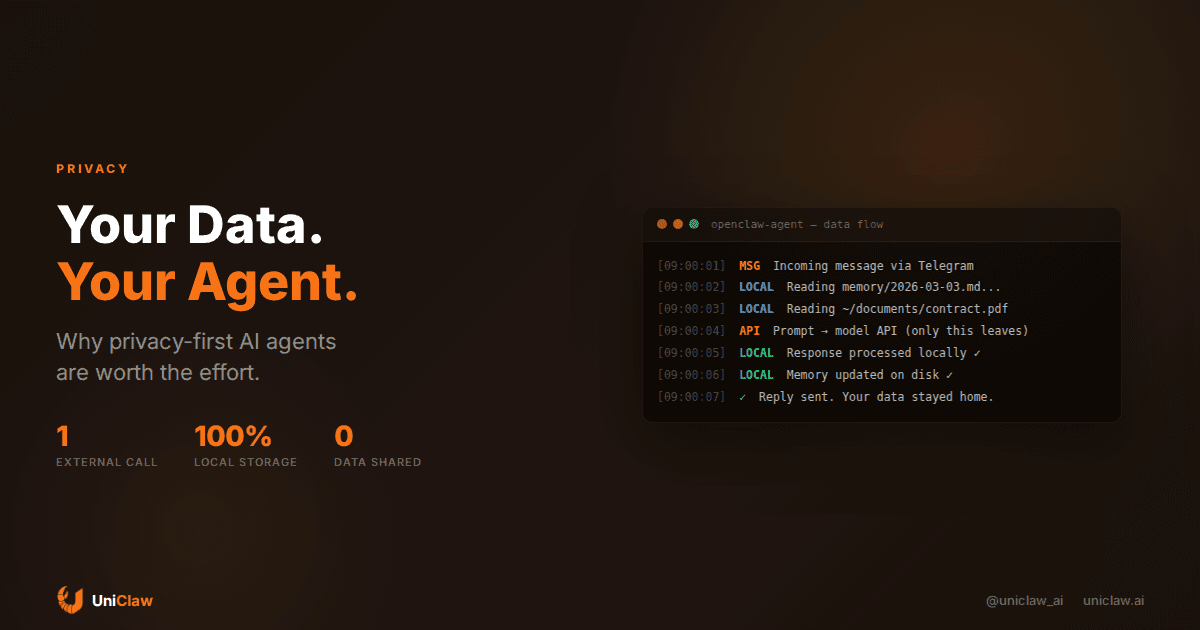
The only data that should leave your machine is the prompt sent to a model API when your agent needs to think. The response comes back, and everything else stays local. You can see exactly what goes out.
And if you want to go fully local, you can. Run an open-source model through Ollama or LM Studio on your own hardware. Nothing leaves. The tradeoff is capability (local models still trail Claude and GPT for complex reasoning), but for a lot of everyday workflows, it's more than enough.
Your agent framework also shouldn't be phoning home. No telemetry, no analytics, no "anonymous usage data" being quietly shipped to some dashboard you'll never see.
How this works in practice
Let's walk through what a privacy-first agent setup actually looks like, because the abstract version isn't very helpful.
You install an open-source agent framework (like OpenClaw) on a machine you own. Could be a laptop, a VPS, a Raspberry Pi, whatever. The agent runs locally. It connects to your chat platforms (Telegram, Discord, Slack) through encrypted tunnels, so there are no open ports on your machine.
When you send your agent a message, here's what happens:
- The message arrives through the encrypted tunnel
- The agent processes it locally, checking its memory files, reading relevant documents from your local filesystem
- If it needs to "think" (generate a response), it sends the prompt to your configured model API
- The response comes back, the agent acts on it locally
- It replies to you through the same encrypted tunnel
The key thing: steps 2 and 5 happen entirely on your machine. The only external call is step 3, and you choose which model provider handles that. If you don't trust any of them, you use a local model and eliminate step 3 entirely.
Compare this to a cloud agent platform where every step happens on their servers. Your files, your messages, your agent's memory, all of it lives in their infrastructure. You're trusting them with everything.
The local model option is better than you think
A year ago, running models locally meant dealing with janky software, limited context windows, and models that could barely write a coherent paragraph. That's changed a lot.
Qwen 3.5 at 9B parameters runs comfortably on a laptop with 16GB RAM. It handles agentic tasks, browses the web, writes decent code. It's not Claude Opus, but it's genuinely competent for everyday agent work.
The setup takes about five minutes. Install Ollama, pull a model, point your agent at localhost:11434. Done.
For most personal automation (email triage, calendar management, file organization, basic research), a local 9B model works fine. You only need to reach for cloud models when you're doing something that requires frontier-level reasoning, like complex code generation or nuanced analysis.
The practical approach: use a local model as your default, and route specific tasks to a cloud model when the local one isn't good enough. That way 80% of your data never leaves your machine, and only the specific prompts that need more power go to an API.
Self-hosted doesn't mean you're alone
One of the objections I hear is "I don't want to manage a server." Fair. Self-hosting used to mean spending weekends debugging nginx configs and worrying about whether your security patches were up to date.
That's not really the case anymore. Managed hosting platforms like UniClaw give you a dedicated cloud machine that runs your agent. You get the privacy benefits of self-hosting (your own isolated VM, your own filesystem, zero-exposure firewall) without the maintenance headaches. Updates happen automatically. Security is handled for you. You just use it.
The data model is different from cloud AI platforms: your agent runs on your dedicated machine, not on shared infrastructure. Your files stay on your VM. Your agent's memory stays on your VM. The hosting provider manages the infrastructure but doesn't have access to your agent's data.
Is it as private as running everything on your own laptop? No. But the gap between "your own isolated VM" and "shared infrastructure with thousands of other users" is enormous.
What to actually look for
If you're shopping for an AI agent setup and you care about privacy, a few questions worth asking:
Is the agent framework open source? If you can't read the code, you can't verify what it does with your data. Open source doesn't guarantee privacy, but it makes dishonesty a lot harder.
Where does the agent run? On your hardware, or on theirs? Words like "serverless" and "cloud-native" are worth paying attention to if privacy is your concern.
What data leaves your machine? Just model API calls? Or does the framework also send telemetry, usage data, or logs to the vendor?
Can you use local models? If the framework only works with specific cloud APIs, you can never go fully private, even if you want to.
And what happens to your data if you stop paying? Does the provider delete everything? Can you export it? Do they keep backups they don't tell you about?
The honest tradeoff
I'm not going to pretend there's no tradeoff. There is.
Cloud AI agents are easier to set up. They often have better integrations, more polish, fancier UIs. The models they use are more powerful because they can afford to run them on expensive hardware.
Privacy-first setups require a bit more effort upfront. You need to make some decisions about where things run and which model to use. Local models are getting better fast, but they're still behind the frontier models for the hardest tasks.
The question is whether that convenience is worth handing over the most detailed profile of your life to a company whose business model depends on monetizing data. For me, it's not. But I understand why reasonable people disagree.
Getting started
The shortest path: install OpenClaw on your machine (or grab a dedicated instance on UniClaw if you don't want to manage infrastructure). Connect your chat platforms. Start with a cloud model like Claude Sonnet, where your prompts go to Anthropic's API but your files and memory stay local. As you get comfortable, try a local model for the routine stuff. Set up permissions so the agent asks before doing anything external.
That gets you a personal AI agent that knows your stuff, runs your tasks, and doesn't hand your life story to a corporation as a side effect.
The technology for this exists today. It's open source, it works, and it's getting better every month. The only reason more people aren't doing it is that the cloud platforms spend a lot more on marketing than the open-source projects do.
UniClaw gives you a dedicated cloud machine for your AI agent: your own isolated VM, zero-exposure firewall, and automatic updates. Starting at $12/month. Your data stays on your machine, not ours.
Ready to deploy your own AI agent?
Get Started with UniClaw