
How to Set Up an AI Agent for Customer Support (That Actually Resolves Tickets)
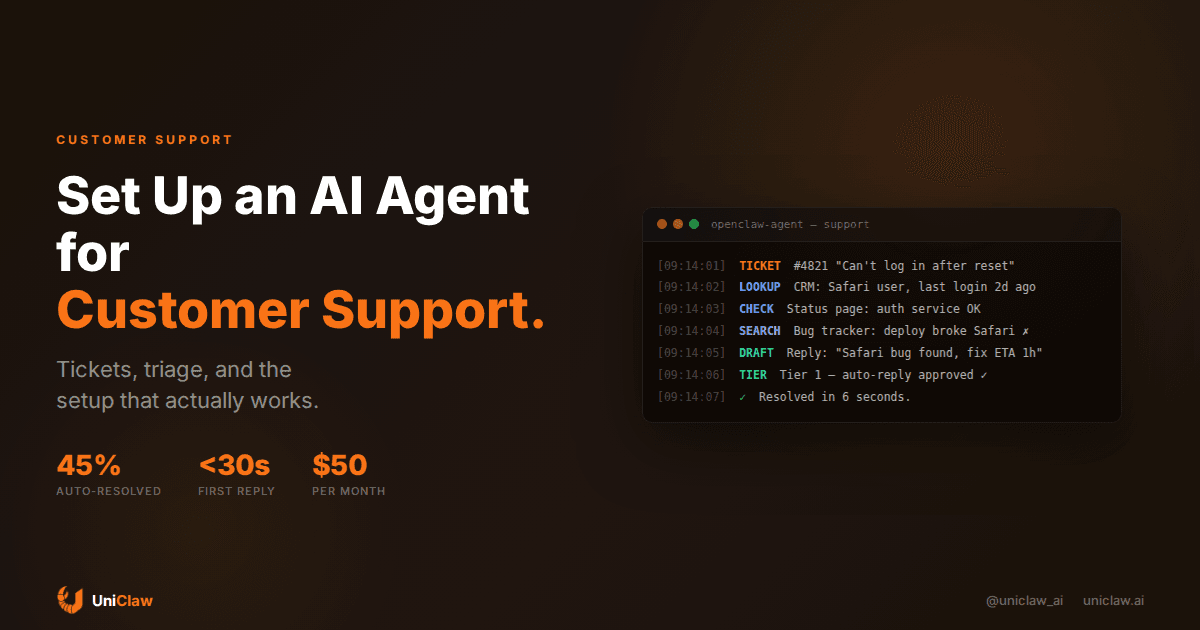
I've been running an AI agent on customer support for about six months now. Not the kind where you slap a chatbot on your website and call it a day. An actual agent — one that reads tickets, pulls context from your docs, drafts replies, and escalates the stuff it can't handle.
Here's what I've learned, including the parts nobody warns you about.
Most "AI support" is still just chatbots with better marketing
Let me get this out of the way. Most tools that market themselves as "AI customer support" are glorified FAQ bots. They pattern-match your question against a knowledge base and spit out the closest answer. When they're wrong, they're wrong confidently. When they can't find a match, they say "Let me connect you with a human" — which is what should've happened from the start.
An AI agent is different. It can actually do things. It reads the ticket, checks your CRM for the customer's history, looks up their subscription status, checks if there's a known bug, drafts a response, and — if you let it — sends the reply. Or it hands you a draft and waits for approval. Your call.
The gap between "chatbot that searches a FAQ" and "agent that resolves a ticket" is enormous. One is autocomplete for support reps. The other replaces the first 15 minutes of every interaction.
What a support agent actually looks like in practice
A ticket comes in: "I can't log in after resetting my password."
A chatbot sends back a generic "try clearing your cookies" article. Useless 70% of the time.
An agent does this:
- Reads the ticket
- Looks up the customer's account (last login, OS, browser)
- Checks your status page — is auth down right now?
- Searches your bug tracker for recent login issues
- Finds that a deploy 2 hours ago broke password resets for Safari users
- Drafts a specific response: "We found a bug affecting Safari users after password reset. A fix is going out within the hour. In the meantime, try Chrome or Firefox."
That took the agent about 8 seconds. A support rep would've spent 5 minutes doing the same investigation, assuming they thought to check the deploy log at all.
Setting this up isn't as hard as you'd think
You don't need a custom ML pipeline. You need three things:
1. An AI agent with tool access. OpenClaw or similar. The agent needs to be able to call APIs — your helpdesk, CRM, docs, maybe your bug tracker. MCP (Model Context Protocol) makes this straightforward: connect tool servers for each system, and the agent discovers what's available.
2. A knowledge base the agent can search. Your docs, FAQs, past tickets, runbooks. Dump them somewhere the agent can access — a folder on disk, a vector database, or just your company wiki. The agent needs to be able to search and read these when a ticket comes in.
3. Rules about what the agent can do alone. This is where most people mess up. Don't give the agent full autonomy on day one. Start with a tiered system:
- Tier 1 (auto-reply): Password resets, "where's my invoice," status checks. Low risk, high volume.
- Tier 2 (draft + review): Refund requests, billing disputes, bug reports. Agent drafts, human approves.
- Tier 3 (escalate only): Account closures, legal complaints, anything unusual. Agent summarizes the context and routes to a human.
Most teams I've talked to keep 40-60% of tickets in Tier 1 after a couple weeks of tuning. That's 40-60% of tickets that never need a human at all.
The numbers that actually matter
People love quoting "AI handles 80% of tickets!" Those numbers are usually garbage. Handling a ticket and resolving a ticket are not the same thing.
Here's what I track:
- Resolution rate without human intervention: What percentage of tickets did the agent close, with the customer confirming the issue was fixed? For me, this sits around 45% after six months.
- Time to first response: Went from about 4 hours (two-person support team) to under 30 seconds. This alone changes how customers feel about your support.
- Escalation accuracy: When the agent does escalate, does it pick the right team? Mine hits about 88%. The misrouted tickets are annoying but not catastrophic.
- Customer satisfaction on agent-handled tickets: 4.1 out of 5 average. Not amazing, not terrible. The speed makes up for the occasional slightly robotic tone.
The metric I care about most: my two support reps now spend 80% of their time on the hard problems, the ones that actually need a human. Before, they spent 80% of their time copy-pasting knowledge base articles.
Where agents fall on their face
Time for honesty.
Emotional customers. If someone is angry, scared, or frustrated beyond reason, the agent makes it worse about a third of the time. It gives a correct answer with zero empathy, and the customer feels dismissed. I had to add a sentiment detection step: if the message reads as highly emotional, skip the agent and route directly to a person.
Multi-turn conversations. An agent handles a single ticket well. A five-message back-and-forth where the customer keeps adding context? It degrades. Context windows help, but the agent sometimes forgets what was said three messages ago or contradicts itself. Keeping conversation state clean is an ongoing headache.
Ambiguous requests. "My thing isn't working." What thing? What does working mean? Humans ask clarifying questions naturally. Agents either ask too many questions (annoying) or guess (dangerous). I've tuned mine to ask one clarifying question and then attempt an answer, but this is more art than science.
Anything involving money. Refunds, billing adjustments, subscription changes — I keep all of these in Tier 2 or above. The agent can pull up billing history and draft a response, but a human clicks "process refund." The cost of a mistake here is too high.
The setup I'd recommend if you're starting from scratch
Here's the shortest path that works:
Step 1: Get an agent running. UniClaw gets you a hosted OpenClaw agent in about two minutes. Connect it to your messaging platform (Slack, Discord, Telegram — whatever your team uses internally first).
Step 2: Connect your knowledge base. Put your docs, FAQs, and runbook files somewhere the agent can read them. A folder on the agent's machine works fine to start. You can get fancy with vector search later.
Step 3: Connect your helpdesk. Use an MCP server for your helpdesk tool (Zendesk, Intercom, Freshdesk, Linear — there are MCP servers for all of them). The agent gets read access to tickets and the ability to post internal notes or draft replies.
Step 4: Start in shadow mode. For the first two weeks, don't let the agent reply to customers directly. Have it draft replies as internal notes on each ticket. Your support team reviews them, sends the good ones, and corrects the bad ones. You learn what the agent gets right and what it doesn't.
Step 5: Open Tier 1. Once you're confident in the agent's accuracy on simple tickets, let it auto-reply to those. Keep everything else in draft mode.
Step 6: Expand gradually. Every week, review what the agent escalated unnecessarily. Move the easy ones into auto-reply. This is how you get from 20% auto-handled to 50% over a couple months.
Total setup time, honestly? An afternoon for the basic version. A couple weeks of tuning to get it good.
What this costs
Running the agent itself: $12/month on UniClaw for the hosting.
Model API costs depend on volume. For a small team handling 50-100 tickets per day:
- Claude Sonnet: around $25-40/month in API costs
- GPT-4o: around $15-30/month
- Gemini Flash (for Tier 1 stuff): around $5-8/month
You can mix models. Use a cheaper model for simple Tier 1 tickets and a stronger model for Tier 2 drafts. OpenClaw lets you configure this per task.
Total: around $50-80/month to automate 40-60% of your support tickets. Compare that to a full-time support hire.
What I'd do differently
If I were starting over:
Invest more time in the knowledge base upfront. The agent is only as good as what it can reference. I spent weeks cleaning up and expanding our docs after the fact. Should've done it first.
Set expectations with customers. We didn't tell customers they were talking to an AI initially. Some figured it out (the response speed is a giveaway) and felt deceived. Now we're upfront: "You're chatting with our AI assistant. A human will jump in if needed." Transparency hasn't hurt satisfaction scores at all.
Build better feedback loops. When a customer says "that didn't help" after an agent response, that's gold. I now pipe those into a daily report so I can improve the agent's handling of those ticket types. Took me three months to set this up. Should've been week one.
This isn't about replacing your support team
I want to be direct about this because the "AI replaces humans" narrative is tired and mostly wrong for support work.
My support team is two people. They handled 60-80 tickets per day before the agent, mostly by copying articles from our knowledge base. Now they handle 25-30 tickets per day, the ones that actually need thought, empathy, and creative problem-solving. They're less burned out. The quality of their responses on the hard tickets has gone up because they're not exhausted from answering "how do I reset my password" for the fortieth time today.
The agent handles the repetitive stuff. Humans handle the human stuff. That split works.
Getting started
If you're thinking about trying this, start small. One channel, shadow mode, two weeks. You'll know within a week whether it's going to work for your use case.
UniClaw is the fastest way to get an AI agent running with the integrations you need. Dedicated machine, always on, connects to all your tools. Set it up in an afternoon and see what your support workflow looks like when an agent handles the boring half.
Ready to deploy your own AI agent?
Get Started with UniClaw